
Lumen
Magic auto brightness based on screen contents
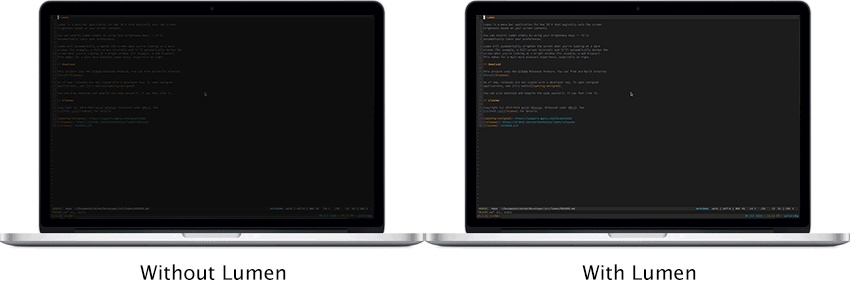
Lumen runs as a menu‑bar utility on macOS and adjusts the display’s brightness in real time according to the visual content of the active window. When a dark application such as a terminal is in focus, it raises the brightness; when a bright window like a web browser is active, it lowers the brightness, using the standard brightness keys for control while learning the user’s preferences automatically.
The tool is intended for macOS users who want a more comfortable viewing experience, especially in low‑light conditions, without relying on the system’s built‑in auto‑brightness feature. It requires screen‑recording permission to analyze the screen content and is not compatible with other brightness‑modifying services such as Night Shift or f.lux. External monitors are not supported directly, though third‑party utilities can synchronize their brightness with the laptop screen.
Installation is offered via Homebrew cask or direct binary download, and the project is released under GPL‑v3. Contributions are welcomed through feature requests, bug reports, and pull requests.
Reviews
Loading reviews…
Similar apps

Display & Accessibility
Lunar
Help you adujst brightness, contrast and volumn of your external display.
Display & Accessibility
Brightness Sync
Utility to synchronise the brightness of LG UltraFine display(s)
Display & Accessibility
Brisync
Utility to automatically control the brightness of external displays
Display & Accessibility
Nocturnal
Dimness and night shift menu bar app
Display & Accessibility
Dimly
Control brightness across mixed monitor setups from one menu bar app.
Display & Accessibility
DarkModeBuddy
Automatically switch between light and dark modes based on ambient light sensor